Ordering Online
Ordering Online
Welcome to our online ordering platform. You may find helpful links and information below to assist you in ordering through our website. We hope to see you soon.
Shipment of cold / frozen products
Due to costs involved, we currently do not ship cold or frozen products however you are most welcome to collect from our store.
Payment of orders
You will be happy to know that you cannot accidently pay for something on our online shop. All orders are reviewed manually by our staff before finalisation. If the shipment request (pickup or delivery) is clearly unknown, you will be contacted to ask how you would like to proceed. Pickup orders are processed quicker as postage doesn’t need to be calculated. If postage is required, the customer will be contacted via email, phone call or via a text message for approval before proceeding.
Once the above the satisfied, payment is then taken and finalised 🙂
Step-by-Step Guide
Below is a five part video showing how an order can be made. If you don’t have an account, please follow the instructions relating to this below.
Part 1 of 5
Part 2 of 5
Part 3 of 5
Part 4 of 5
Part 5 of 5
Logging in to your account
If you have a wholesale account with us, use your main email address to login here. If you have forgotten your password or it does not work (can occur when we go through maintenance), please use the ‘forget password’ link found here and follow the prompts.
If you are a regular customer with us, please login here using your regular email address you use to contact us with. If you have forgotten your password or it does not work (can occur when we go through maintenance), please use the ‘forget password’ link found here and follow the prompts.
To log out: please go here and or alternatively if you are currently logged in, click here to logout.
Understanding scale or weighed products
Part 1 of 4
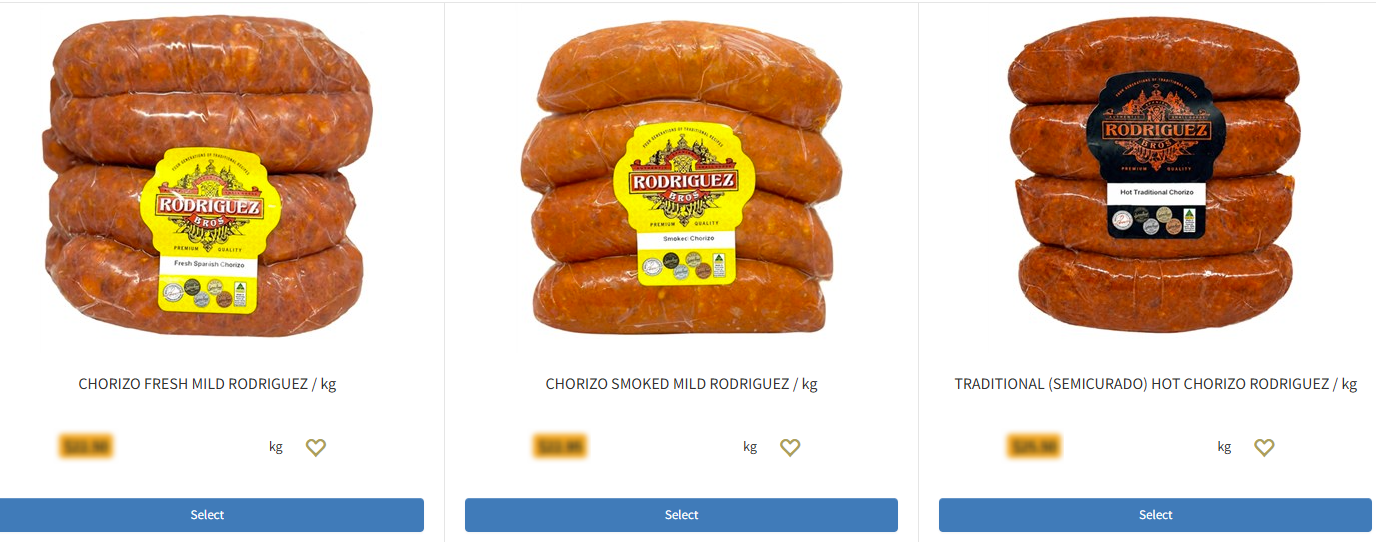
When you select a scale product meaning a product from our website that is sold by the kilogram, you must use the ‘Select’ button. An example of this is ⬇️ shown below ⬇️ Clicking the button will take you to the product screen where you can say how you would like to buy of that product and by which ‘pack’.
Part 2 of 4
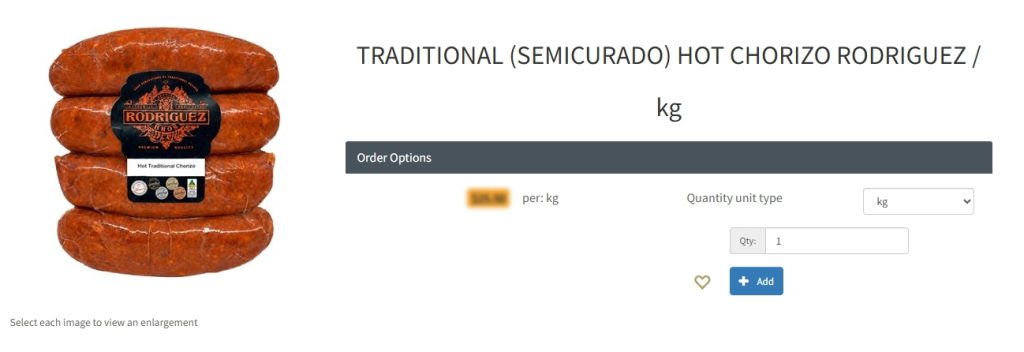
When you go the the product screen, you will probably see the default unit set to ‘kg’. You can easily change this by selecting the unit drop-down menu and select a different unit such as ‘4 pack’ for example. The product screen options will look something like the ⬇️ image below ⬇️
Part 3 of 4
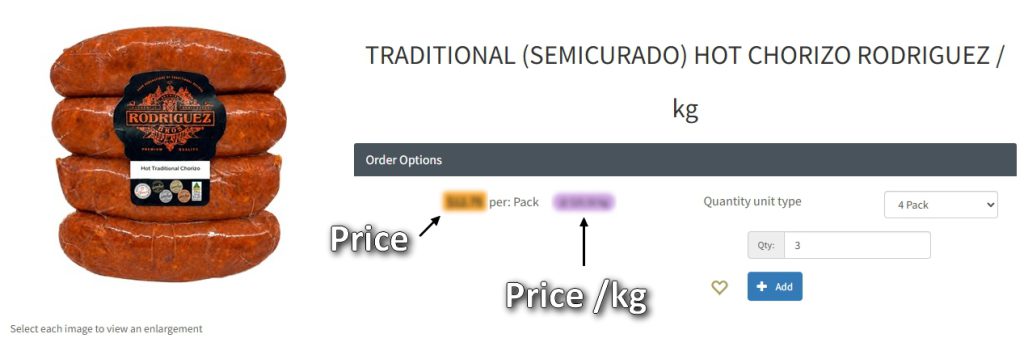
When you select a pack option, you will see an ⬇️ orange and purple price tag ⬇️ The orange one is the price of the pack you’ve selected at this moment. The purple price is the price of the product per kilogram
Part 4 of 4
In your cart, you will notice that weighed products have extra information after their name, like for example “OQ: 3 4PkWt: 0.5”. ⬇️Below⬇️ is an example of what you would see in your cart. This is what that means:

“OQ: 3” means : You have ordered 3 packs.
“4PkWt: 0.5” means: You chose the 4-pack. For your information, each pack weighs about 0.5kg